|
VOICE CHANGING SOFTWARE
|
WRITERS SCREENPLAY SOFTWARE
|
SITE MAP
HOME PAGE
PRODUCTS
DOWNLOAD
MERCHANDISE
COMMUNITY
SUPPORT
ABOUT US
AUDIO DEMONSTRATION
VOICE CHANGING SOFTWARE
VOICE CHANGING PACKS
STORY WRITERS SOFTWARE
POCKETFART
(new)
Related Items
Using MorphVOX with Vonage SoftPhone
MorphVOX Voice Changer Software can be used with Vonage SoftPhone. Just follow the steps below.
Run MorphVOX Pro and make sure the "Listen" button is off so you do not hear your voice when talking.
Run Vonage SoftPhone (X-PRO) progams.
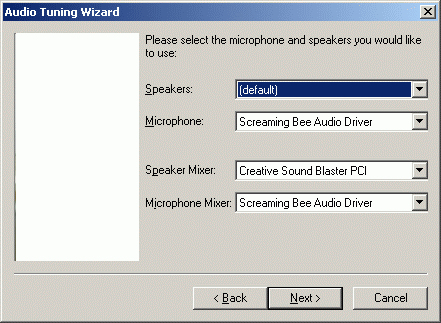
Right-click on the skin of the SoftPhone Application and select "Audio Tuning Wizard."
Click "Next" and change the Microphone and Microphone Mixer to "Screaming Bee Audio Driver" as shown below.
Click "Next" and continue with the remainder of the steps in the Tuning Wizard.
MorphVOX sound tips:
Set the quality to highest by accessing MorphVOX/Preferences/Sound Settings.
Reduce the microphone volume if you get distortion or feedback.
Try other voice packs for more variety of voices
.
Click to Go Back
Copyright © 2005-2010, Screaming Bee LLC,
All Rights Reserved.
HOME PAGE
|
PRODUCTS
|
PRIVACY STATEMENT
|
STORE POLICY
|
CONTACT US
|
OUR LINKS
|
JOBS
|
SITE MAP
VOICE CHANGING SOFTWARE
|
STORY WRITERS AND SCREENPLAY SOFTWARE
|
TEXT-TO-SPEECH VOICES
VST EFFECTS
|
VOICE OVERS
|
GAMING
|
VOICE
|
VOIP
|
MULTIMEDIA