|
MorphVOX Voice Changer Software can be used with audio editors like Sony Sound Forge.
Sound Forge is a professional-grade tool for editing audio clips for movies, animations and
other sound-related projects. Sound Forge can be found at the
Sony Media Software Site
You easily intergrate MorphVOX voice changer with some minor adjustments in Sound
Forge.
MorphVOX can be used as the recording source, providing a seamless
experience for your audio creation. Here's how to set that up:
1. Run Sound Forge
2. Click the Record Button
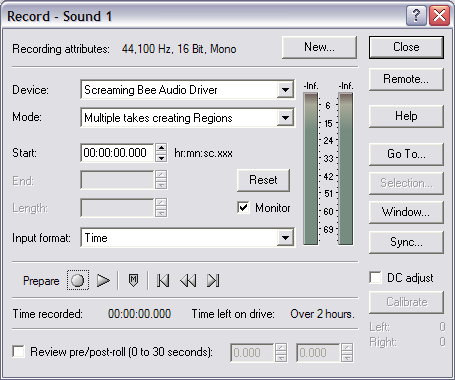
3. The following dialog will display.
4. Set the "Device:" to "Screaming Be Audio Driver".
|