 |
|
MorphVOX can be used with Dungeons & Dragons Online (DDO). You can change your
voice to match you in-game character.
DDO is the first MMORPG with built-in voice chat. Adding voice changing to DDO is
simple. You'll be up and running with a new voice in very little time with some
simple settings in the game.
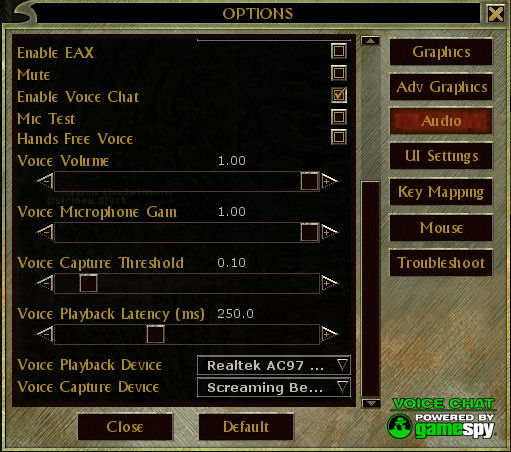
After installing DDO, Open the Audio Options Panel. Make sure to
scroll
all the way to the bottom
of the Audio Options Panel. You should
see the following image:
|
|
|
Dungeons & Dragons Online: Audio Options Panel
|
 |
MorphVOX integration with DDO
To set up DDO to run properly with MorphVOX:
- Set Voice Capture Device to "Screaming Bee Audio Driver"
-
Check the Enable Voice Chat box
Testing the voice changing
You can test to see how your morphed voice sounds in DDO. Simply click the
Mic Test check box on to hear how you sound in game. You should
also turn off "Listen" in MorphVOX to avoid duplicating the playback sound of your
voice and improve CPU performance for the game.
|
|
Game play tips:
-
For hands-free experience (not requiring push-to-talk) check
the Hands Free Voice option.
-
To help with performance you may want to use push-to-talk. Click here
to learn more about assigning keys. You can assign the same trigger key in MorphVOX and DDO for ease-of-use.
-
Create custom sound effects
and assign Quick Effects
to give orders or insults.
-
Change your voice with Quick Voices.
-
If you have a slower machine drop you Morphing quality. To learn more
click here.
|
|
Trouble Shooting:
-
Unable to hear voice in DDO: Make sure that the
Voice Capture
Device
is set to Screaming Bee Audio Driver. Adjust volume and microphone
boost if signal is low.
-
Playback in MorphVOX stutters when you run the game. On some
machines, the high CPU usage of DDO will kill performance on the MorphVOX "Listen"
playback. In pretty much all cases, the voice quality to the actual game is unaffected.
Turn off "Listen" in MorphVOX and use the built-in Mic Test feature
of DDO to test the actual voice quality.
|
|
|
|
Click to Go Back
|
|