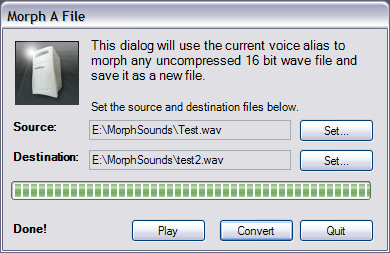
MorphVOX can load in an existing audio file and apply the current voice alias to output a new "morphed" file. This is ideal for enhancing existing audio content or creating new voices.
Note, audio files must be in 16 bit uncompressed wave format.
Press this button to set the existing audio file you would like to convert.
Set Destination
Press this button to set the destination file for the conversion.
Play
The Play button appears after converting the file. Pressing "Play" will launch your default wave audio player and start playing the destination file so you can hear the final result.
Convert
Begin morphing the source file and writing out the destination file. The above progress meter shows the conversion progress. This button will change to Abort during conversion so you can stop the convert process before completion. * If your get an error converting to a file you just played you will need to close the file in your player before you can write over it again.
Begin morphing the source file and writing out the destination file. The above progress meter shows the conversion progress. This button will change to Abort during conversion so you can stop the convert process before completion.
* If your get an error converting to a file you just played you will need to close the file in your player before you can write over it again.
Quit
Closes the dialog. If you have completed a conversion, the destination file will remain after closing this dialog.