A Voice Alias is a way to store how your voice is morphed so the same
settings can be used later. This tutorial
will take you step by step through the creation of a custom alias.
1. The best way to create an Alias is to start with an existing
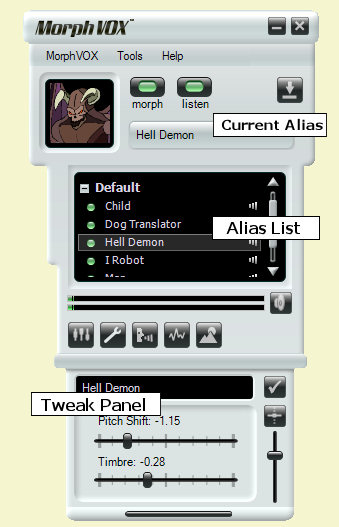
one. First, select an alias. In the example below it is "Child."
2. Open the "Tweak Sound" panel (The wrench button shown
above).
3. Turn duplex on so you can hear and test out your tweaking.
4. Move the Pitch, Timbre and
Timbre
Strength
sliders so your voice comes out as desired.
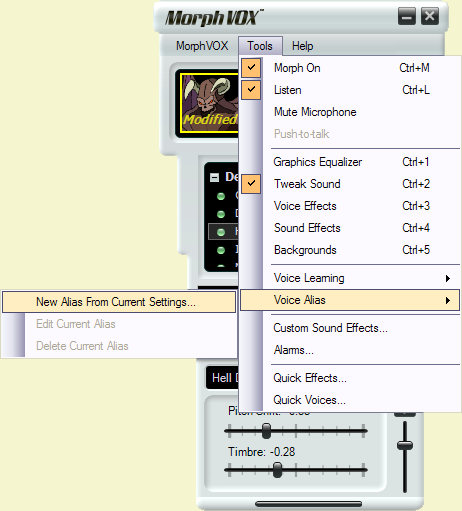
5. Now save these settings by selecting the "
Tools: New Alias
From Current Settings
" menu item.
6. The first panel in the wizard introduces you to the Alias
wizard. Click next.
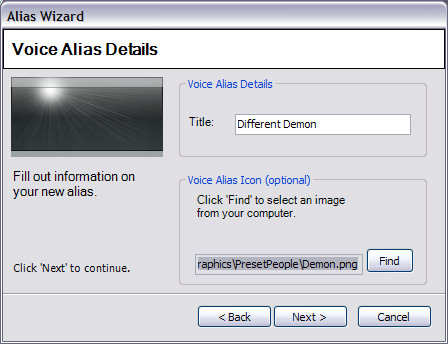
7. The next panel lets you type in the name of the new alias and assigns
a picture to appear when the alias is selected. Picture icons can be
.png, .jpg or .gif. For optimal display quality it is best to use 128 X
128 pixel size images. An icon is not required.
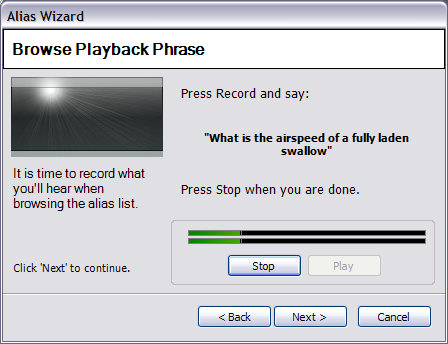
8. The final settings panel records the alias phrase. This is the
sound you hear when you press the play button next to the alias. If you
don't like the suggested phrase you can make up your own.
9. You are done!
After the final panel your new alias will appear in the list under the "User
" node and can now be used. If for some reason you'd like to delete the
alias, just right click on the alias and select "Delete Alias". You
can also click on the alias and from the "Tools" menu
select "Delete Alias".
Diese Website verwendet Cookies und ähnliche Technologien, um die Funktionalität der Website bereitzustellen, den Verkehr und die Nutzung zu analysieren und auf Ihre Interessen zugeschnittene Inhalte bereitzustellen. Mehr