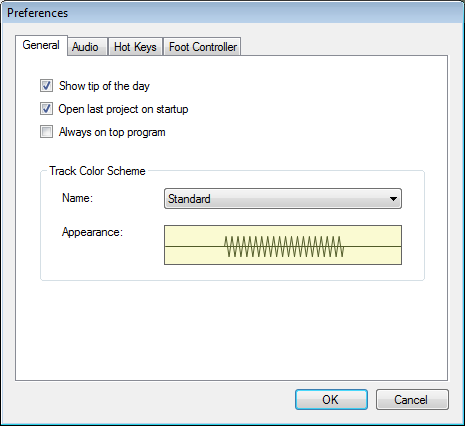
These preferences control startup and graphic options.
Click on this checkbox to turn on and off tips. These
appear on start up and provide useful hints on using Voice Again better
When Voice Again is opened it will load the last project that you opened or
saved.
Always on top program:
Sets Voice Again program to be always in the foreground on the desktop.
Track Color Scheme:
Allows you to pick from a set the color schemes for the Track View.
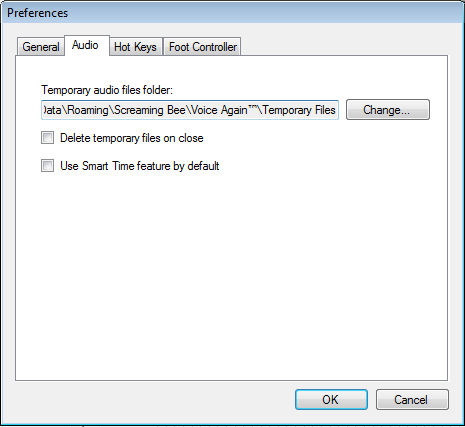
These preferences control the some overall audio settings for Voice Again.
Temporary audio files folder:
Choose the default folder for saving temporary audio files. Temporary files are
used for improving playback performance and reducing project load time.
Delete temporary files on close:
Check this if you want to delete temporary files on close of the program. If you
choose this option then project load will take significantly longer.
Use Smart Time feature by default:
Choose this option if you want to use the Smart Time feature as a default
setting when importing new audio files.
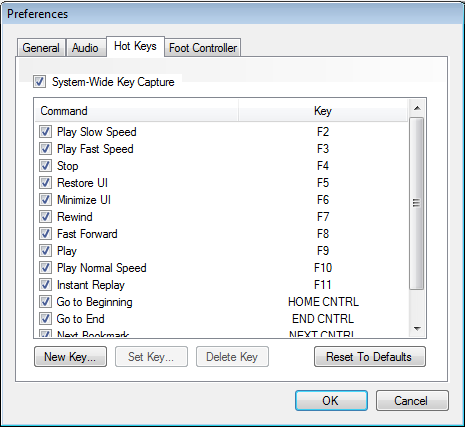
This panel provides you with a way of mapping keystrokes to commands for
convenient navigation and control of Voice Again.
System-Wide Key Capture
Allows Voice Again to receive key commands even if the program is running in the
desktop background.
List of Command-Key Mapping:
Displays the list of active commands and associated hot keys. Click the
check mark next to the command to activate or deactivate the command.
New Key:
Allows you to add new command/hot key combinations to the list.
Set Key:
Allows you to set or change the hot key associated with a command in the list.
Delete Key:
Deletes a command/hot key item from the list.
Reset to Defaults:
Resets the list of commands/hot keys to their original state
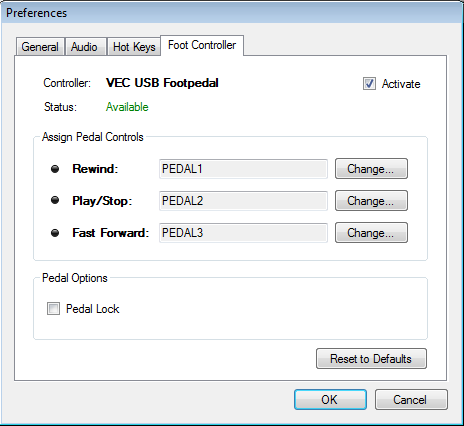
This panel allows you to configure plug-and-play foot controller devices to work
with Voice Again.
Controller Labels:
Shows the plug-and-play device connected and available to Voice Again.
This will be gray if no device is available for the program.
Activate:
Sets if the controller is "On" if the checkmark is checked or "Off" if the
checkmark is unchecked.
Rewind:
Allows you to set which pedal on the controller should be associated with the
rewind command.
Play/Stop:
Allows you to set which pedal on the controller should be associated with the
play/stop command.
Fast Forward:
Allows you to set which pedal on the controller should be associated with the
fast forward command
Pedal Lock:
Allows you tap the pedals once to start playback and tap the pedal again to stop
playback.
Reset to Defaults:
Resets the foot controller settings to their original state
Este sitio utiliza cookies y otras tecnologías similares para proporcionar la funcionalidad del sitio, analizar el tráfico y el uso, y entregar contenido adaptado a sus intereses. Infórmese Más