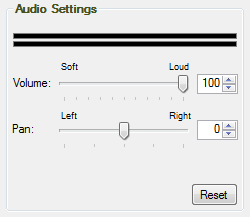
The volume meter provides a graphic display of the audio output when playing
back a recording.
The Volume slider lets you adjust the global output volume to your speakers,
from soft to loud. To lower the volume, move the slider to the left (soft). To
increase the volume, move the slider to the right (loud).
The Pan slider lets you adjust the global mixture of left and right channels in
a stereo recording. To shift the sound to the left speaker, move the slider to
the left. To shift the sound to the right speaker, move the slider to the right.
To reset the volume and pan controls to their original state, click on the “Reset" button.
|