MorphVOX Voice Changer Software can be used with Vonage SoftPhone.  Just follow the steps below.

  1. Run MorphVOX Pro and make sure the "Listen" button is off so you do not hear your voice when talking.
  2. Run Vonage SoftPhone (X-PRO) progams.
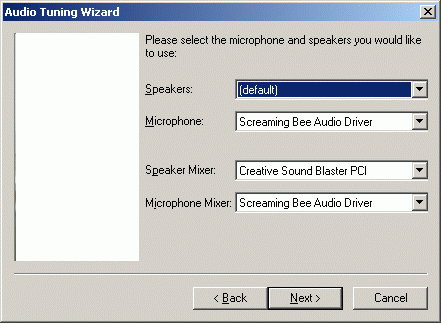
  3. Right-click on the skin of the SoftPhone Application and select "Audio Tuning Wizard."
  4. Click "Next" and change the Microphone and Microphone Mixer to "Screaming Bee Audio Driver" as shown below.
  5. Click "Next" and continue with the remainder of the steps in the Tuning Wizard.

MorphVOX sound tips:

  1. Set the quality to highest by accessing MorphVOX/Preferences/Sound Settings.
  2. Reduce the microphone volume if you get distortion or feedback.
  3. Try other voice packs for more variety of voices, click here.
Click to Go Back
Download MorphVOX

Click the logo for a tutorial on setting up MorphVOX

Diese Website verwendet Cookies und ähnliche Technologien, um die Funktionalität der Website bereitzustellen, den Verkehr und die Nutzung zu analysieren und auf Ihre Interessen zugeschnittene Inhalte bereitzustellen.   Mehr