MorphVOX Voice Changer Software can be used with SAM Broadcaster.  You can morph your voice during a live podcast!  Just follow the steps below.

Setting up SAM Configuration

  1. Run SAM Broadcaster software.
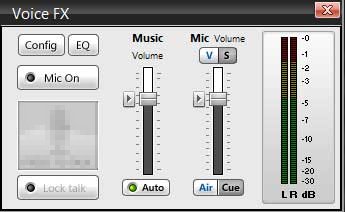
  2. Find the "Voice FX" panel.
  3. Click on the "Config" button as shown below.


Details on SAM VoiceFX Settings

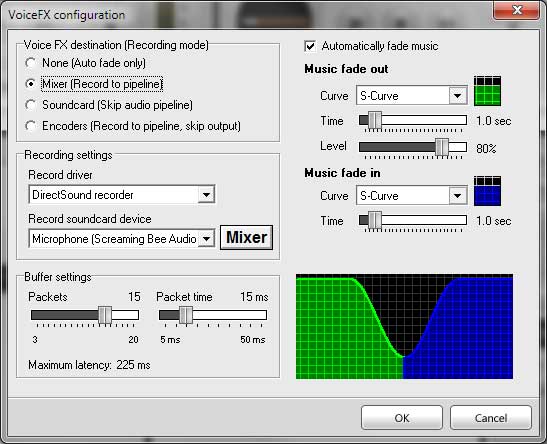
  1. Set the Voice FX Destination to "Mixer (Record to Pipeline)".
  2. Set the Record Sound Device to "Screaming Bee Audio".
  3. Set the buffer settings as shown below. You will need at least a 200ms latency.
SAM Configuration

MorphVOX sound tips:

  1. Reduce the microphone volume if you get distortion or feedback.
  2. Try other voice packs for more variety of voices, click here.
Haga Clic para Regresar
Download MorphVOX

Click the logo for a tutorial on setting up MorphVOX

Este sitio utiliza cookies y otras tecnologĂ­as similares para proporcionar la funcionalidad del sitio, analizar el tráfico y el uso, y entregar contenido adaptado a sus intereses.   Infórmese Más