|
MorphVOX can be used with World of Warcraft (WoW) in-game chat. You can change your
voice to match you in-game character.
Adding voice changing to WoW is
simple. You'll be up and running with a new voice in very little time with some
simple settings in the game.
-
After installing WoW, update your game client to version 2.2 or above.
-
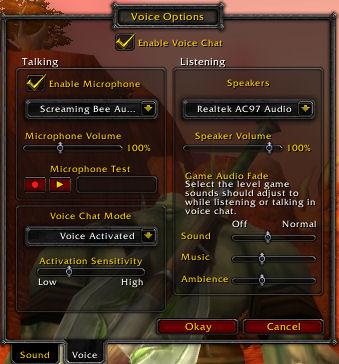
Open "Options --> Sound and Voice" and Select the "Voice" tab. This
will bring up the following panel:
|
|
|
World of Warcraft: Voice Options Panel
|
 |
MorphVOX integration with WoW
To set up WoW to run properly with MorphVOX:
-
Check the Enable Voice Chat box
- Enable Microphone
- Set the device list to "Screaming Bee Audio Driver" as shown on the picture
Testing the voice changing
You can test to see how your morphed voice sounds in WoW. Simply click the
red Record Button to record your voice. Then click the yellow
Play Button to listen to your voice. You should
also turn off "Listen" in MorphVOX to avoid duplicating the playback sound of your
voice and improve CPU performance for the game.
|
|
Game play tips:
-
For hands-free experience (not requiring push-to-talk)
choose the Voice Activated option.
-
To help with performance you may want to use push-to-talk. Click here
to learn more about assigning keys. You can assign the same trigger key in MorphVOX and GSC for ease-of-use.
-
Create custom sound effects
and assign Quick Effects
to give orders or insults.
-
Change your voice with Quick Voices.
-
If you have a slower machine drop you Morphing quality. To learn more
click here.
|
|
Trouble Shooting:
-
Unable to hear voice in WoW: Make sure that the
Microphone
Device
is set to Screaming Bee Audio Driver. Adjust volume and microphone
boost if signal is low.
-
Playback in MorphVOX stutters when you run the game. On some
machines, the high CPU usage of WoW will kill performance on the MorphVOX "Listen"
playback. In pretty much all cases, the voice quality to the actual game is unaffected.
Turn off "Listen" in MorphVOX and use the built-in Mic Test feature
of WoW to test the actual voice quality.
-
My voice sounds Muffled: the codec in the WoW voice client may
reduce the brightness of the morphed voice. Try increasing the 1K, 2K and
4K bands in the Graphic Equalizer by 1-2 ticks.
|
|
World of Warcraft is a trademark of
Blizzard Entertainment, Inc. Screaming Bee Inc. is in no way associated with
Blizzard Entertainment.
|
|
 |
|
Haga Clic para Regresar
|
|