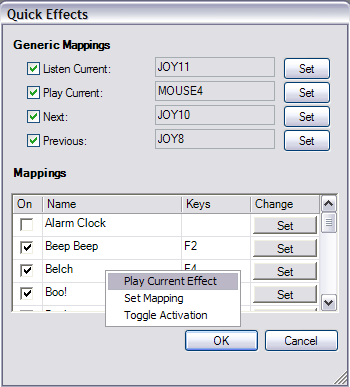
MorphVOX has the ability to assign a key, mouse or joystick button to any sound
effect. The following dialog can be found from the Tools menu "Quick
Effects..." item.
Listen Current: Maps
a key that will play the currently selected sound effect on your speakers only.
Play Current: Maps the key that
will play the current effect out to others.
Next: Maps the key that will
change to the next sound effect.
Previous: Maps the key that will
change to the previous sound effect.
On: Activates
the current mapping so when the key is pressed the sound effect plays out to
others.
Keys: Mapped key name.
Name: Name of the effect.
Change: Push the "set" button to
assign a key to the effect.
* You can right click on a sound effect and select
"Play Current Effect" to hear the effect.