These preferences control startup and graphic options.
Load MorphVOX on starts up:
click on this checkbox to turn on and off automatic launch of MorphVOX when
your computer starts up.
Show tip of the day: click
on this checkbox to turn on and off tips. These appear on start up and provide
useful hints on using MorphVOX better.
Auto-Start Voice Doctor: starts voice doctor automatically
on startup if voice learning is needed.
Start Minimized: starts MorphVOX with minimized user interface.
Opacity: Adjusts MorphVOX's
opacity level. Move to the slider to the left to make the application more
transparent.
Use 24 hr clock: This changes alarms
and time announcements to use a 24 hour clock (e.g. 14:42 versus 2:42 pm).
Show Add-On Links: Show add-on link in the alias, sound effects
and background lists. This gives you quick access to any new downloadable MorphVOX
packs.
Announce alias change: provides auditory cue (sound clip) every
time the alias is changed using the key-mapped trigger.
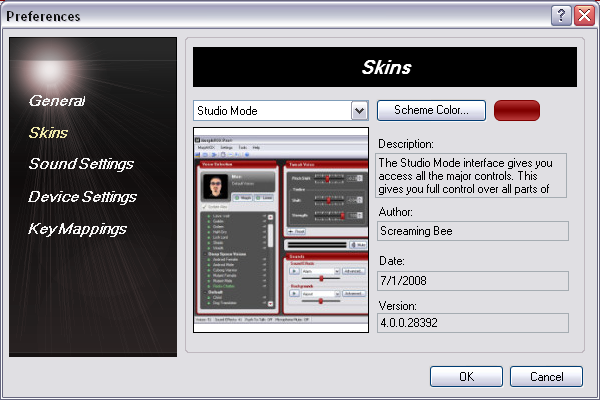
This page lets you pick the skin to be displayed.
Scheme Color (only in Studio Mode): provides the
ability to change the whole color scheme of the the main user interface in
Studio Mode. This does not affect the color of the user interface when
MorphVOX is in skinned-mode.
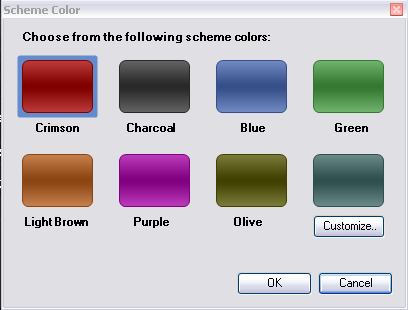
This control lets you choose your user interface color
scheme from a palette of colors or to customize a unique color scheme.
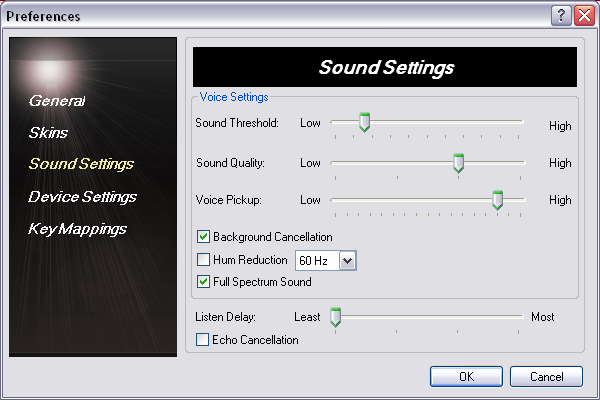
This page gives you access to advanced sound settings.
Sound Threshold: This
determines how loud sound needs to be before being Morphed. With more background noise, this level may need to be
raised higher.
Leaving this setting higher ensure that background noise isn't being morphed. If this level is too high it may result in the voice not being
morphed properly. The default is Low.
Sound Quality: This determines how
much processing is dedicated to morphing your voice. The higher the
slider, the more CPU time will be consumed by MorphVOX and the better sounding
the morphing will be. The default is the 2nd position.
Voice Pickup: This
adjust how sensitive MorphVOX is in picking
up your voice. Slide it to right if you are getting yoddling or choppiness in your
Morphing. Slide it ot the left to increase the crispness or cleaness of the speech.
Listen Delay: This slider
determines the delay between when you speak and when you hear your voice. The
default is the first position.
Background Cancellation: This works in conjunction with "Sound
Threshold" to completely eliminate background sound or noise. Turn this off
if you find your voice is choppy.
Hum Reduction (50 or 60 Hz): This reduces the noise from any electrical
source that produces a 50 or 60 Hz Hum.
Full-Spectrum Sound: This maintains full frequency (20-20,000hz)
sound during morphing to produce a better quality sound. Turning this feature
on does use more CPU however.
Echo Cancellation: Check this to
remove/reduce any echo when you have MorphVOX set on listen mode (so you can
hear yourself talk). The default is to have this unchecked.
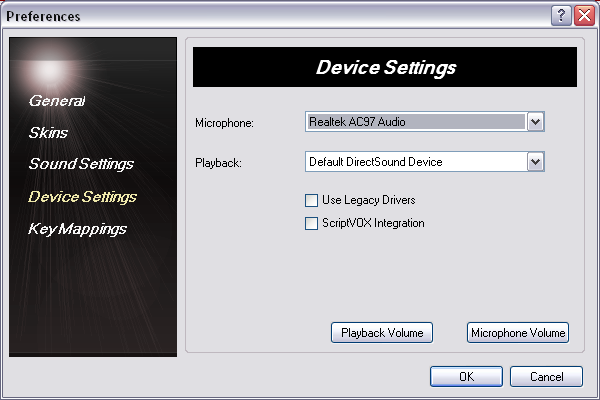
This page allows you to manually set the microphone and
speakers used by MorphVOX.
Microphone: This drop-down will list
all the valid microphone input drivers on your machine. Choose the device
that is attached to the microphone you will use for input into MorphVOX.
Playback: This is a list
of devices used to play audio. Choose the one you would like MorphVOX to use for echo/Listen and auditioning sound effects. Usually this should be
left as "Primary Sound Driver".
Playback Volume: Allows you to access the Windows playback volume
control.
Use Legacy Drivers: Use an older way of capturing and playing back audio.
This should only be used if you are having audio glitching problems, or you are using echo cancellation.
ScriptVOX Integration: Allows remote control of MorphVOX voices
from ScriptVOX Studio when this control is checked.
Microphone Volume: Allows you to access the Windows recording/microphone
volume control.
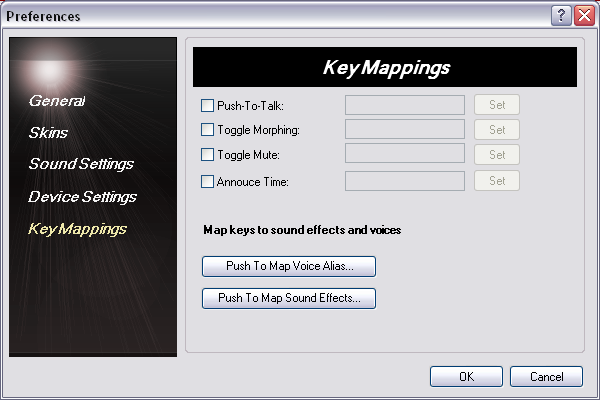
This page allows you assign keys to various commands
used by MorphVOX.
Check this when
you want to only morph your voice when pressing a specific set of keys, thus
freeing all the CPU for games and controlling when your voice is
heard. Set the activation key (or combination of keys) by using the
"Set" button.
Check this
when you want to toggle between your normal voice and the current voice
alias. Set the activation key (or combination of keys) by using the
"Set" button.
Check this when
you want to use a key to announce the current time through your
speakers. Set the activation key (or combination of keys) by using the
"Set" button.
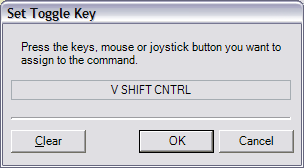
The Voice Toggle Keydialog shown
above sets the key(s) used to activate the command. To set your toggle
key, press the keys you would like to hold down when activating.
Click OK with the mouse when the keys for toggling have been
set.
NOTE:: If you do not hold down the
SHIFT modifier, any letters you press will be "lower-case" even
though it is displayed as "upper-case" in the box. It is important to type the
exact key combination you want to assign to the command.
This site uses cookies and other similar technologies to provide site functionality, analyze traffic and usage, and deliver content tailored to your interests. Learn More