If you are running Windows Vista, 7 or 8 click   こちら.

The following are instructions for Windows XP:

You can set the default microphone driver to "Screaming Bee Audio" by selecting from the MorphVOX Tools menu "Default System Microphone" and then click OK on the control panel dialog.  If this is not set some games such as Counter Strike will not pick up the morphed voice.

The following describes how to manually set the default audio device to the Screaming Bee Driver from your Windows XP control panel.  To set it to your sound card driver and disable morphing just change back to your sound cards driver and not "Screaming Bee Audio".


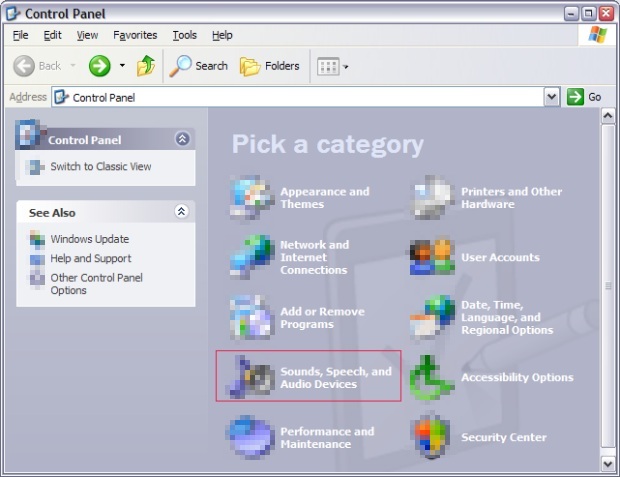
Step 1 - Open the control panel from the windows start menu
Click on Sound, Speech, and Audio Devices.
 

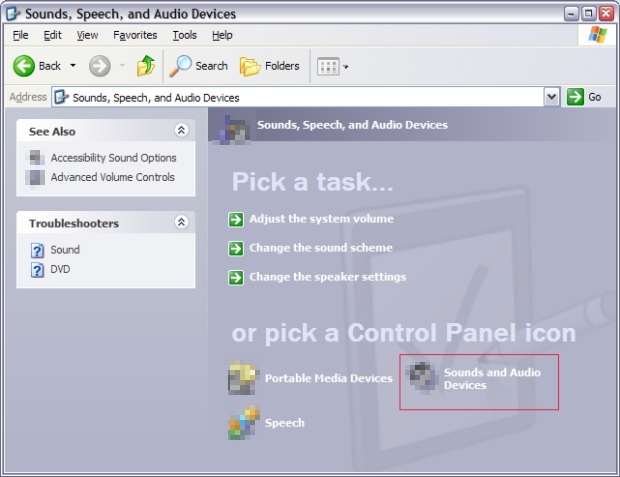
Step 2 - Select Sounds and Audio Devices
 

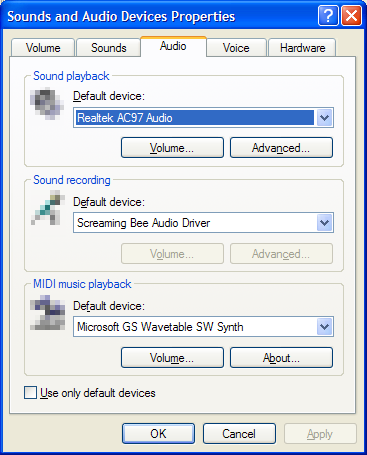
Step 3 - Change default Sound recording device
 Click on the Audio tab and change the Sound recording Default device to Screaming Bee Audio Driver.

* It is normal to have the "Volume" and "Advanced" buttons to be grayed when the Screaming Bee Audio Driver is selected.
 

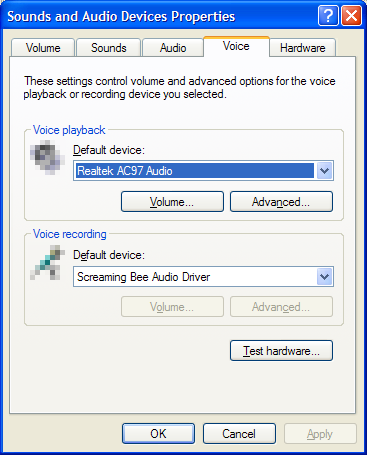
Step 4 - Change default Voice recording device
 Click on the Voice tab and change the Voice recording Default device to Screaming Bee Audio Driver.

* It is normal to have the "Volume" and "Advanced" buttons to be grayed when the Screaming Bee Audio Driver is selected.
Click OK and now games and chat programs should pick up your morphed voice by default.
Click to Go Back
このサイトは、Cookieおよびその他の同様のテクノロジーを使用して、サイトの機能を提供し、トラフィックと使用状況を分析し、興味に合わせたコンテンツを配信します。   さらに詳しく